Cross-Account Metrics
Centralize metrics from multiple AWS accounts into a single pipeline and view them from one pane. Cross-account metrics are available on the advanced tier and above.
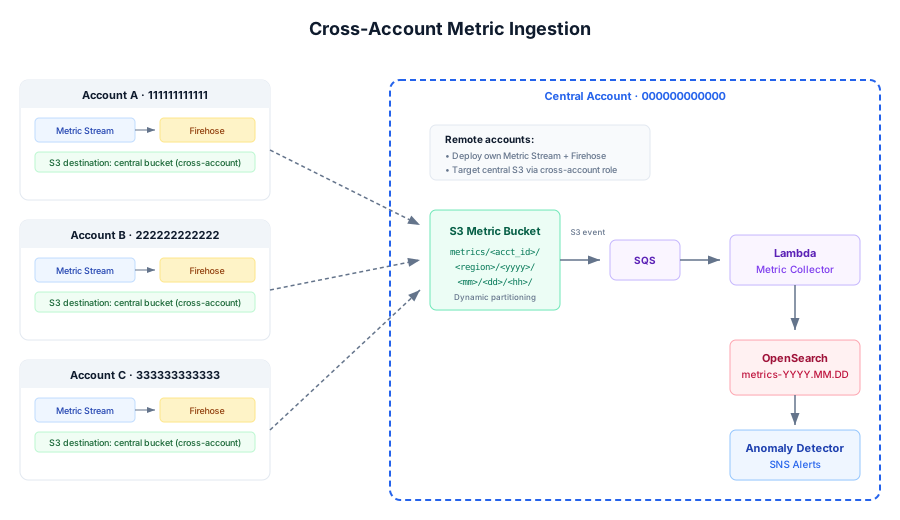
Remote accounts stream metrics into your central S3, partitioned by account, region, date, and hour, so every account's metrics are queryable from a single OpenSearch instance.
Setup
Provide the organization ID and/or remote account IDs during deployment. The stack allows remote accounts to forward metrics into the central account, and each remote account deploys its own CloudWatch Metric Stream. The setup-cross-account-metrics script (.cmd/.sh) for remote account configuration is in Guides & Downloads.
Per-subscription account filtering lets you scope a subscription to the local account, specific accounts, or all accounts.
Cost monitoring across accounts
If cross-account metric streams include AWS/Billing from linked accounts, the billing processor computes per-account per-service deltas, and alerts include the account ID.
AWS/Billing/EstimatedCharges is published only in the Organization's payer account, so AIMonitor/Billing / DailySpend stays empty if AI Monitor runs in a member account. To fix it: enable Billing Alerts in the payer account, set OrganizationId (or add the payer to CrossAccountIds) on the stack, then in the payer account run the setup-cross-account-metrics script (.cmd/.sh, in Guides & Downloads) filtered to AWS/Billing (us-east-1 only). Allow ~2 days of history before DailySpend populates. Non-org separate accounts: enable Billing Alerts in each and forward them the same way with the same script.
Remote management from the editor
On the Enterprise tier the Subscription Editor supports remote subscription management — browse, subscribe, and unsubscribe cloudwatch namespaces/metrics in remote accounts in the same region.